
Best Tools to Get More Google Reviews in 2026 (Honest Comparison)
An honest comparison of the tools local service businesses use to get more Google reviews — Google's free options, StarFlywheel, NiceJob, Grade.us, Broadly, Podium and Birdeye — with sourced prices.
The Problem Is Not Your Customers
A driving school finishes the week with twelve students who passed their road test. Twelve families who are thrilled. On Monday the owner checks Google: no new reviews. Across town, a competitor with a similar pass rate has three hundred reviews and sits at the top of the map results.
The competitor's customers are not happier. Somebody there simply asks every one of them, at the right moment, with a link that takes ten seconds to use. That is the whole difference, and it is what review tools sell: not reviews, but the end of forgetting to ask.
This guide compares the tools local service businesses actually use to get more Google reviews — from Google's own free options to all-in-one platforms that cost hundreds a month. Full disclosure: this is the StarFlywheel blog, and StarFlywheel is on the list. We have tried to describe it with the same honesty as everyone else, including what it does not do. Competitor prices were checked in October 2026 and are linked to their sources, because pricing in this category changes often.
What a Review Tool Actually Does
Strip away the feature lists and every tool in this category does some combination of four jobs:
- Asks. Sends a review request by text or email after a job, appointment, or visit, usually with a direct link to your Google review form.
- Makes asking physical. QR codes for the counter, the invoice, the van, the waiting room.
- Watches. Pulls your new reviews into one place so you notice them, especially the bad ones.
- Helps you reply. Templates or AI-drafted responses so every review gets an answer.
The first two are what move your review count. The second two protect your rating. Everything else in the big platforms — web chat, payments, phone systems, listings management — may be useful, but it is not what gets you more Google reviews, and it is usually what makes the price jump.
What to Look For Before You Pay
Where it can send people versus what it can monitor
These are two different things, and vendors blur them. Almost any tool can send a customer to any review site — all it takes is a link. Pulling reviews back into a dashboard is harder and usually covers fewer platforms. Ask each vendor specifically: "Which platforms will I see reviews from inside your app?"
Price per location, and the contract
Many platforms price per location, so a business with three locations pays three times. Some require annual contracts or setup fees. For a single-location business with a modest marketing budget, a $300-per-month tool has to produce a lot of new customers to pay for itself.
Text messaging that respects the rules
Text requests get far more attention than email, but in the US they require prior consent from the customer and a clear way to opt out. A good tool handles the opt-out for you. Getting consent is still your job, ideally when you book the appointment.
No review gating
Some tools still offer "smart routing": ask customers how they feel first, send only the happy ones to Google, and divert the unhappy ones to a private form. Google's review policies prohibit discouraging negative reviews or selectively soliciting positive ones, and gating can put your reviews at risk. Ask everyone the same way. If a vendor's pitch leans on filtering out unhappy customers before they reach Google, treat that as a warning sign.
The Tools, Compared
Google Business Profile — free
Before paying anyone, use what Google gives you. From your Business Profile you can create a review link or QR code that opens your review form directly. You can also read and reply to every review from the same place.
The link is the single most important asset in your review program, and it costs nothing. Put it in your email signature, on your invoices, in your appointment confirmations, and on a printed card at the front desk. Our guide to the Google review QR code covers printing and placement.
What it lacks: any automation. Nothing sends the link for you after a job, nothing follows up, and nothing tells you whether every customer was actually asked. It works if you or your team remember to ask every time. Most businesses discover they do not.
Best for: every business, as the foundation — and as the whole program for a solo operator who sees a handful of customers a week.
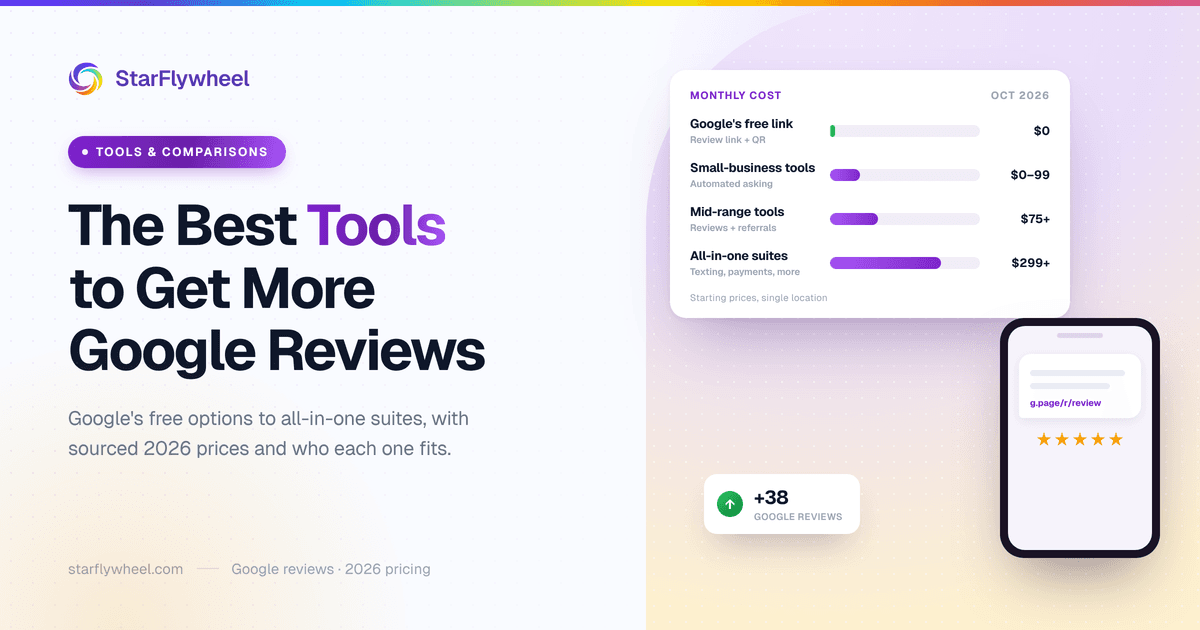
StarFlywheel — $0 to $99/month (our product)
StarFlywheel is built for small local businesses that want the asking automated without paying for an all-in-one platform. You import customers by CSV or enroll new ones automatically, and it sends review requests by email and text (US and Canada) through campaigns you set up once. It generates QR codes with a printable kit, and requests can point to any platform you choose: Google, Yelp, Facebook, or a custom link.
On monitoring, it is deliberately narrow: it tracks your Google reviews on every plan, and adds Yelp on Growth and Pro. Reviews arrive on your plan's sync schedule, from monthly on Free to daily on Pro. It does not monitor Facebook or other platforms. AI can draft replies to your reviews (Standard and up), but you paste the reply into Google yourself; it does not post to Google for you.
Pricing: Free ($0, 25 email requests a month, one QR code), Lite ($9), Standard ($29, up to 3 locations), Growth ($49, up to 5 locations, Yelp monitoring, scheduled campaigns and segments), Pro ($99, up to 10 locations, daily sync, competitor benchmarking). Paid plans have a 7-day trial with no card. See the pricing page for full limits.
What it lacks: web chat, payments, a phone system, or listings management. It is a younger, smaller product than the others here.
Best for: single- and multi-location service businesses that want automated asking and Google tracking at a small-business price.
NiceJob — from $75/month
NiceJob is a review and referral tool popular with home service businesses. According to its pricing page, the Starter plan is $75 a month and includes SMS and email review requests, website review widgets, social sharing of reviews, a staff leaderboard, and a reviews microsite. The Pro plan, at $125 a month, adds win-back and referral campaigns, email marketing, AI-written review replies, and competitor tracking.
What to weigh: there is no free plan, and the most useful growth features sit on the $125 tier. The automation is solid. One caution on the leaderboard: Google's 2026 contribution policy bars review quotas for staff, so if you use it, track request activity rather than review counts.
Best for: home service companies that want reviews and referrals in one tool. We also have a direct NiceJob comparison.
Grade.us — from $99/month
Grade.us grew up as a white-label review tool for marketing agencies, and it still shows. Its plans page lists a Small Business plan at $99 a month for one location, a Multi Location plan at $60 per location per month for two to ten locations, and agency plans from $400 a month, with a 14-day free trial.
What to weigh: it is powerful for an agency managing many clients under its own brand. For a single owner-operator, it is more tool than most need.
Best for: agencies and consultants running review programs for several clients.
Broadly — around $249/month (listed)
Broadly combines review requests with customer communication tools such as web chat, and it has historically focused on home and local services. We could not confirm current pricing on Broadly's own site; software directory Capterra lists a starting price of $249 a month. Confirm current pricing with Broadly directly.
What to weigh: you are paying for communication tools alongside reviews. Worth it if you would use web chat and messaging; expensive if all you want is more Google reviews.
Best for: service businesses that want reviews and website chat from one vendor.
Podium — quote-based (reported from $399/month)
Podium is an all-in-one platform: business text messaging, web chat, payments, marketing campaigns, and reviews. It does not publish full pricing on its website. A March 2026 pricing breakdown from Quo reports Core at $399 a month, Pro at $599 a month, and Signature on custom quote. Treat those as estimates and expect a sales call.
What to weigh: Podium is strong if you want one inbox for every customer text and payment. If reviews are the main goal, most of the price goes to features you did not come for. Our Podium alternative guide and side-by-side comparison go deeper.
Best for: larger or multi-location businesses that want texting, payments and reviews in one platform and have a budget to match.
Birdeye — reported from $299/month per location
Birdeye is a broad reputation and customer-experience suite: reviews, listings, messaging, surveys, social tools, and AI features across all of them. Its pricing is per location, and some of it sits behind a sales form. Cost comparison site Costbench (last verified August 2026) lists Starter at $299, Growth at $349 and Dominate at $449 per location per month, with custom pricing for larger accounts.
What to weigh: the depth is real, and so is the cost — a three-location business is looking at roughly $900 a month or more before add-ons. See our Birdeye alternative guide or the direct comparison.
Best for: multi-location brands with a marketing team that will use the whole suite.
Side-by-Side Comparison
Prices as of October 2026, from the sources linked above. "Quote-based" means the vendor does not publish full pricing; figures in parentheses are third-party reports.
| Tool | Starting price | Price published by vendor | Reviews it monitors | Best for |
|---|---|---|---|---|
| Google Business Profile | Free | Yes | Google (your own profile) | Every business, as the foundation |
| StarFlywheel | $0–$99/month | Yes | Google (all plans), Yelp (Growth+); sends to any platform | Small and multi-location service businesses |
| NiceJob | $75/month (Pro $125) | Yes | See vendor | Home services wanting reviews + referrals |
| Grade.us | $99/month; $60/location for 2–10 | Yes | See vendor | Agencies and consultants |
| Broadly | Not confirmed (listed from $249/month) | Not confirmed | See vendor | Reviews plus web chat |
| Podium | Quote-based (reported from $399/month) | No | See vendor | All-in-one texting, payments, reviews |
| Birdeye | Quote-based (reported from $299/location/month) | Partly | See vendor | Multi-location brands with a marketing team |
We have not listed competitors' monitored platforms because we could not verify them from their own published pages. Ask each vendor directly — it is the question that matters most after price.
Which Tool Fits Your Business
The right tool depends less on features than on who asks and when in your business.
Home services: the technician asks
Plumbers, HVAC companies and electricians win reviews at the truck, in the ninety seconds after the job is done. You need a same-day text for the jobs where nobody asked in person, a QR code on the invoice and the van, and ideally a way to see whether every completed job actually got a request. Our home services review guide covers the playbook.
Dental and medical practices: the front desk asks
Patients come back on a schedule, the front desk sees everyone, and privacy rules shape what you can say in replies. Email requests after the appointment work well, and a QR code at checkout catches the rest. See our dental practice review guide.
Salons and spas: the stylist asks
Clients have a relationship with one person, and they visit often — so you can ask after the third visit rather than the first. A QR card at the station does a lot of the work. Our salon review strategy has the details.
Auto repair: the service writer asks
The moment of trust is when the customer picks up the keys and the bill matches the estimate. A text that evening, naming the service writer, converts well. More in our auto repair review guide.
Driving schools and other lessons: the instructor asks
The happiest moment is unmistakable — the student just passed. Ask that day, and ask the parent too when they paid. Our driving school guide covers timing around road tests.
In every case, the tool's job is the same: make sure the ask happens even on the days nobody remembers. If you mostly need that, a low-cost tool or Google's free link plus discipline will cover you. If you also need team texting, payments and listings across many locations, the bigger platforms start to justify their price.
The Rules Every Tool Has to Follow
No tool changes the rules, and a few vendors still sell features that break them. Whatever you choose:
- Never offer incentives for reviews. No discounts, gift cards, or entries into a draw in exchange for a review. Google's policies prohibit it.
- Do not gate. Ask every customer the same way. Do not filter unhappy customers away from Google.
- Do not solicit Yelp reviews. Yelp's guidelines discourage businesses from asking for reviews. A link to your Yelp page is fine; a campaign asking for Yelp reviews is not. Our guide to Yelp reviews explains the difference.
- Get consent before you text. Collect it when you book, and include an opt-out in every message.
Start Free, Upgrade When the Asking Becomes the Bottleneck
Here is a sensible order of operations for most local businesses:
- Create your Google review link and QR code today. Put them on your invoice, your email signature and your front desk.
- Use our review request templates to write a short, neutral ask that references the visit and the date — not a staff member.
- Run it by hand for two weeks. Count how many customers you served and how many reviews came in.
- If the gap is that people forgot to ask, automate the asking with a low-cost tool. If you also need texting, payments and team inboxes, compare the all-in-one platforms.
More background on the method is in our guide on how to get more Google reviews. Once the reviews are coming in, put them to work on your own site — our guide to showing Google reviews on your website covers that. And if you want a wider look at the category, including response and monitoring features, see our review management software comparison.
Ready to grow your review count?
StarFlywheel sends customers to the review platforms that matter to you and tracks your Google reviews automatically — free to start, paid plans from $9/month.
Ready to grow your reviews?
Start building your review flywheel today. Free plan available, no credit card required.
Start Free